Challenge 1 Solutions

So did you figure it out?
How many records did you find with inconsistencies between Gender and Title?
Post your solution below in the comments (remember to include a screenshot 📷 or a video 🎦 walk-through of your solution so others can see as well as the .dmx file containing the function/workflow containing your solution.)
Comments
-
Sample Solution
To access the sample solution provided for this challenge, please toggle the below:
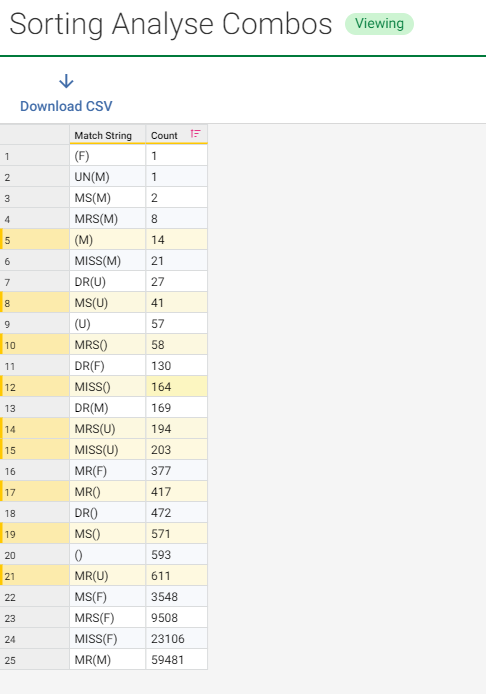
My approach to this challenge was to build a function (see here for a high level overview) that classifies gender-specific titles and then feeds that into a decision to find the mismatches. The approach I took, identified a total of 408 records with mismatches (output summary image here).
However, I did notice (through profiling the combinations of title and gender), that there were some further discrepancies where the title was unknown but the gender was specified (and vice-versa)
See below for a copy of my workflow and function.
0 -

1. After importing the data I used a Group step, by title.
2. Then exported the results of this step to create a second CSV to which I manually added a GenderMatch column with the logic Mr = M etc.

(I'm sure it is possible to replace this step and create the lookup table within the workflow.)
3. I amended the Group step, all columns, to remove any duplicates, leaving ~60k of the original ~99k rows.
4. Used a Lookup step to add a new column mapping the correct Gender for each title based on the second CSV.
5. Filter step to remove all 'U' rows (those where Title is Dr, null or UN)
6. Transform step to add a True/False column comparing source gender with lookup gender.
7. Split step to get all of the False rows where the original gender is not as expected.
There are 2,154 rows where the title does not match the expected gender (including Gender is null or 'U', but Title is known)
 4
4 -
This is the solution we came up with in our breakout team at the Knowledge Cafe session. Thanks @Candice Tsang@YvonneSaulnier, @Romiel Noumbissi, @Jacky Lu and Ashley.
First we explored the example data View, grouping on Gender (to see the unique genders) and the Title (to see unique genders). This showed us the sort of problems we'd need to handle in the gender mismatch logic.
We considered two options:
- Using a domain with valid title / gender combinations, and a function that does a lookup
- Hard-coding values into a function that checks the combinations
In the interests of time, and because we thought it was unlikely that we'd encounter new gender and title values in later updates of the data, we went for the hardcoded option.
We decided to create a saved function called "Check gender and title are not mismatch", which would return true (if no mismatch) or false (for mismatch). We'd then have the ability to use this function as a rule in a Validate step to easily explore failing rows and check metrics for rule failure.
First we created some parameters and test values:

Then we created 3 conditions:
- If the gender is empty (null or whitespace only) or U, there will be no mismatch (Equals check)
- If the gender is M, the title cannot be "Mrs", "Miss", or "Ms". If there is, it's a mismatch (2 Equals checks, And'd together)
- If the gender is F, the title cannot be "Mr". If there is, it's a mismatch (2 Equals checks, And'd together)
We fed these 3 conditions into an If Then Else. Note that I've used variables for each of the 3 output conditions above for readability of the function:

Finally, we saved the function, and used it as a rule in a workflow:

DMX (with the workflow and saved function):
Note: Against all best-practice, we didn't add summaries, descriptions, or documentation to our function or workflow. Ooops 😬
4 -
Step 1: Profiled the data given for Challenge exercise to check the values in Title and Gender columns


Step 2: Applied Transform step (to a new column TitleGender Check_1) to check the exact result on Title column with the condition:
-Set F if the title is Miss/Mr/Ms/Mrs
-Set M if the title is Mr

Step 3: · Compared if ‘Gender’ column is equal to ‘TitleGender Check_1’
- True/False status is set to records depending on the result

Step 4: · Identified Gender mismatches/Gender Unknowns by filtering the rows on below logic

Case 1: Exact Mismatch - 409


Case 2: Exact Match - 95,643

Similary solved case 3 to case 6.
dmx file attached.
2 -
1- I've started with grouping to see available combinations:

2- Then, to be able to use later on, I included all these combinations;

3- I created a new column and function:

4- In the function, I used 4 or conditions to be able to get what I need;

One for M;

One for F;

One for null/unknown ones;

and last one for F/M ones;

And in the end I have 'Title vs Gender Mismatch Flag';

5- Added a validation step and created a rule using this flag column and got 3.182 rows failed;

6- Took a snapshot of the failed rows in the end;

Here is the workflow;

Here is the dmx file;
3