Finding special characters in a column

Hi,
I was looking for a way to find in a column special characters. For example I have a Data column and I would like a new column to be created next to it with the special characters listed. I would be grateful for any advice one he matter. Thank you :)
Data | Expected Output |
|---|---|
000000000000000364 | |
00000146 | |
00000259$% | $% |
000066001 | |
000066008 | |
000066036AA | |
000066231 | |
000173 | |
00020 | |
0002223CCC | |
0002350 | |
000286 | |
0AAA-00296 | - |
000315 | |
000650. | . |
00#066008@ | #@ |
00066248 | |
000680 |
Comments
-
Hello
There is a Function called 'Remove noise' that will automatically clean any special characters from input values.
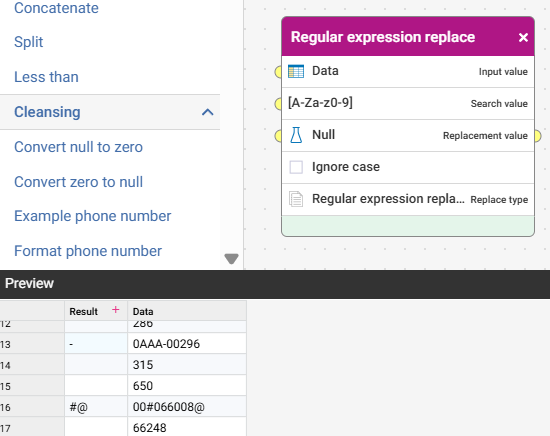
To meet your specific requirement of a new column I would use a Transform step/action, Duplicate the 'Data' column then apply the Function 'Regular expression replace' to set all the standard non-special characters to null
Function script:
RegexReplace([c:Data], '[A-Za-z0-9]', null, false)
 1
1 -
Thank you very much! I will try it out :)
1 -
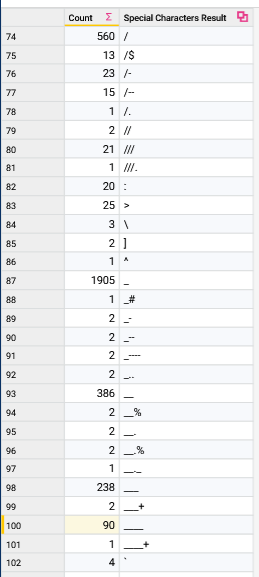
Hi @Josh Boxer if I may ask a followup question. Below is the result I have. If there a way I can get a count per special character?
For example rows 74-81 have "/" and what I am looking for is a table that shows that the character "/" appeared
in (sum of 74-81) which would be 636 and this approach replicated for each special character. So it would a table counting each special character across this count result.
 0
0 -
Maybe try something like this:
Use a Space character rather than Null as the replacement value so that each symbol becomes a 'space separated word'
0 -
I’d suggest this one instead @Wojciech Glowacki
but otherwise yes, as @Josh Boxer suggested, if you prepare the special characters first so that they are space separated, then that’ll treat them as ‘words’ so this above workflow can be used to extract a special character frequency distribution table
0 -
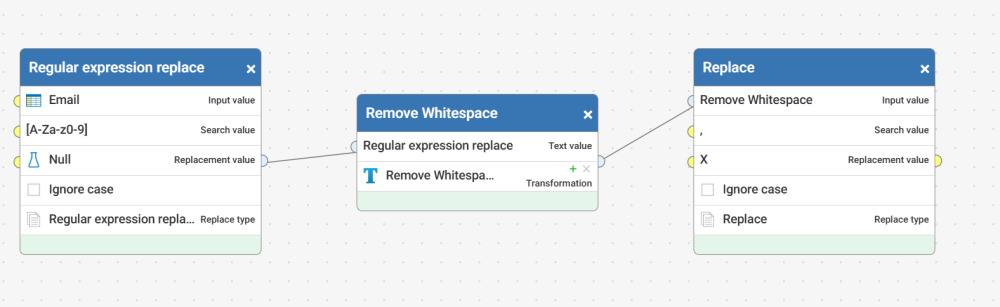
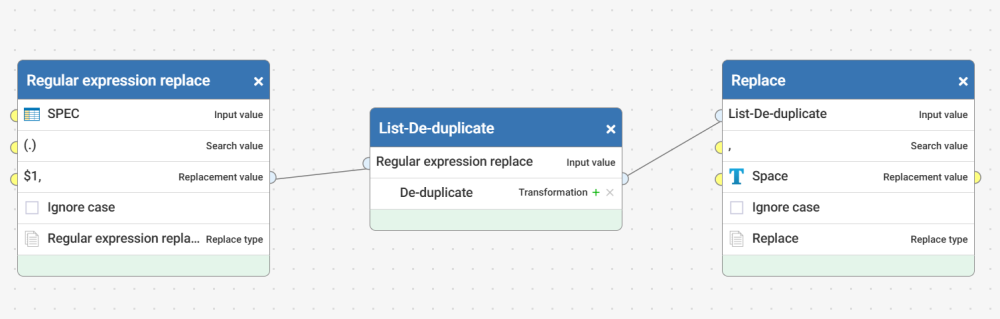
This was a fun exercise to try. I had to tweak the Reusable workflow you linked, as there is a step there to remove noise. Other things I did:
- After stripping out the special characters, I changed the comma to an 'X'
- Turned the result into a list, then did a deduplication on the list (Request was count by rows, but total values), then I replaced the comma with a space
- Then fed that thru the 'Find Most Common Words' workflow
1 -
-
-
I am sure someone could find a more elegant way to prep the data in 1 go, but this worked for me. I changed the special character comma to an 'X' so that it didn't mess up the lists and changing it to a space.
0