Keeping the drill down option from multiple Validation Steps

Hello,
We are looking for support, while we create a workflow within it we have multiple Validation steps (each needs different source combinations). At the end we do w Union of the "Show Results by Rule" and we want to create a snapshot of that output. However we noticed that the union disables the Drill Down option to see Passing and Failing rows. We would be grateful for some advice how can we do it and keep the drill down option. Thank you very much in advance.
Answers
-
The Take snapshot step can be Interactive following Validate, Group and Profile steps, but Union step is not supported for interactivity.
You should be able to make the snapshot multi-batch and interactive then add to it with Validate Results by Rule from multiple sources (without needing to Union)
Batches:
0 -
Hi Josh. Thank you very much for your answer. Just to be sure do you mean If I have 2 Validation steps they would just point to the same DataSet in the snapshot (which is Interactive and Multibatch - example below). Could you confirm?
If so everytime we run the workflow it will create additional rows with a different timestamp. Is there a way we just keep to newest timestamp and maintaining the drill down?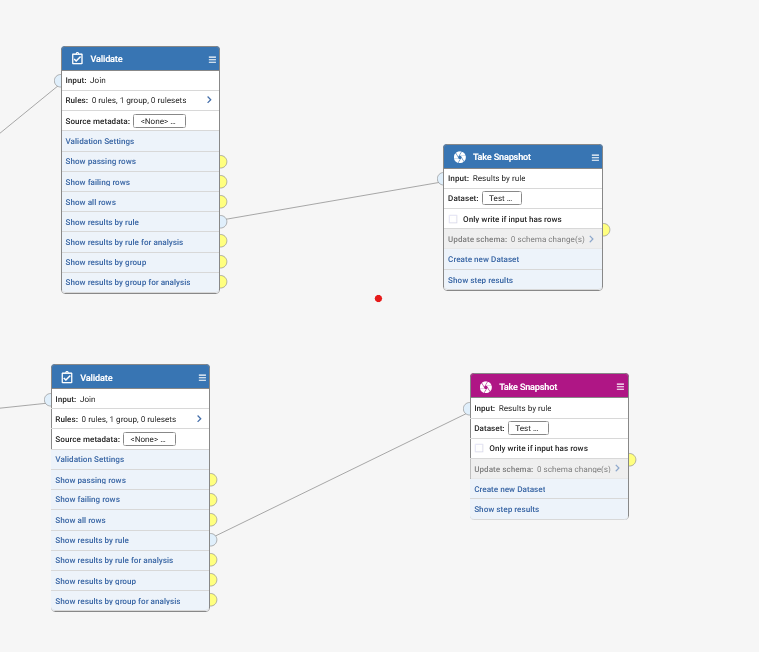 0
0 -
It is important to us as we want to us the output on one of the Dashboard pages. Multibatching and creating more and more rows will make it harder to consume.
0 -
From the article i shared
"Each multi-batch Dataset has an optional limit on the number of batches it can have. When new data is loaded into that Dataset, if the specified number of batches would exceed the limit, the oldest batch will be automatically deleted". Update the Snapshot dataset details to only keep the latest N batches. Alternatively set all batches to be deleted after say 7 days and rerun the Workflow to populate the Dataset0