ADS functionality: splitting many‑to‑many relationships into rows

Answers
-
Hello, it would help to have an example of the data you have and the data you would like.
I have made up an example - a student can take many courses and a course can have many students: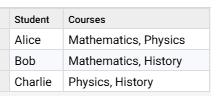
and assume that 'individual rows' means you want the values in the selected object type to be duplicated:
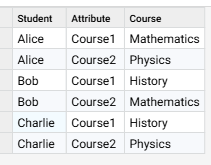
You can achieve this using the Columns to rows step, but need to split the comma-separated list of 'Courses' into individual columns. You can split up Lists using the list functions, I have sorted the values then extracted the second value as a new column named 'Course2', repeat this for as many values/columns are required:
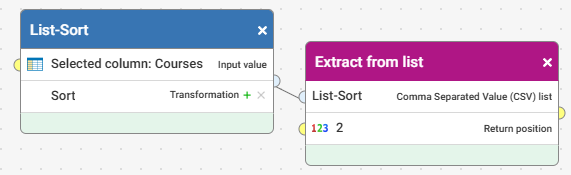
If there are different numbers of values in each list then you can filter out null values from the column following the Columns to rows step.
0 -
Hi Josh, thanks for this explanation. However, in a case where 'courses' increases over time. How do I set this so it automatically picks it without the need to revisit everytime?
0 -
You would need more Functions/columns that you will ever need and then set these null rows to be filtered out following the Columns to rows step. Another thought is to use the List count Function to alert if the number in a list is ever higher than the expected level
0 -
Right, Thanks.
I will explore the alert option.Thanks once more
1