Show Additional Metadata Fields in External Systems Menu (Date Modified, Filesize etc)

What problem are you facing?
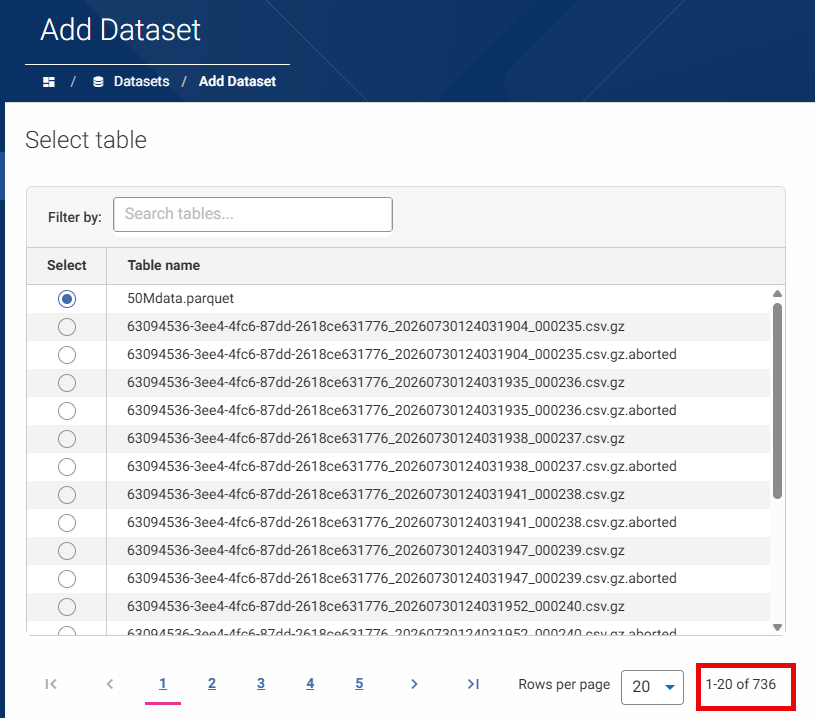
I have several external system connections to file based systems such as Experian STS (SFTP), S3, each lots of files present, in some cases 100s or 1000s
What impact does this problem have on you/your business?
Whilst it's useful to be able to search for the file I want, I sometimes need to see additional metadata to make the decision. The most common case is wanting to select the most recently modified file.
Another common is largest or smallest filesize.
Do you have any existing workarounds? If so, please describe those.
I can connect to the same external system with another tool such as WinSCP, which shows file size and date modified, grab the filename and then search this in Aperture.
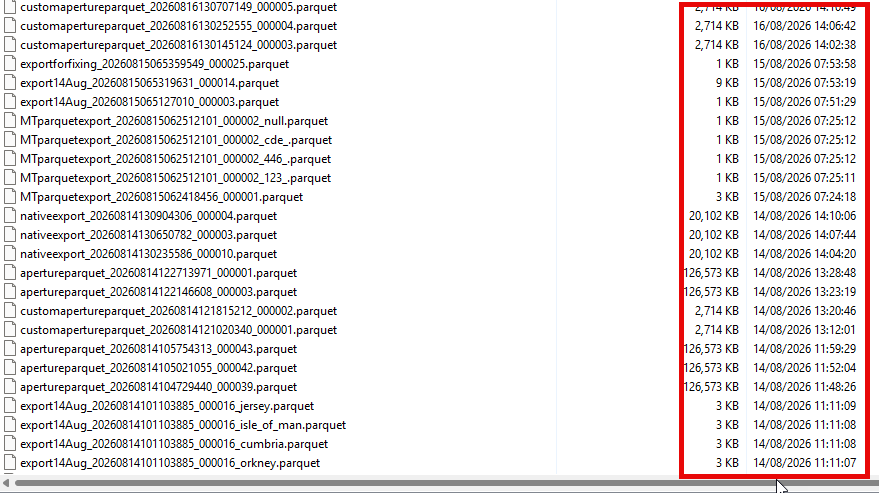
This works in some cases, however in others the external system is only accessible from Aperture - for example an S3 bucket with Instance Profile authentication.
Do you have any suggestions to solve the problem? Feel free to add images if this helps.
It'd be helpful if some basic metadata was added as additional columns in the dataset wizard, and the ability to sort or filter on those columns.
e.g sort by Date Modified