Is there a way to replicate the COUNTIF formula?

After a validation step and choosing the 'Show failing rows' option, I want to be able to count the number of fails each client has. Some clients can be failing across all rules, others might only be failing on one. I want a column at the end to that will sum up all of the fails on each row
Comments
-
You want to calcualte the 'Total validation failures per row (rows are clients in your case).
The good news is this is already calculated for you, just not in exactly the format you require.
There is a column in the 'Show failing rows output' you are using named 'Row quality', which is the percentage of non-ignored rules that passed. So if you have 10 rules and the row failed 2 the value will be 80% (8/10)To turn this percentage into the total number of fails you would use a Function to divide Row quality by 100 (to make it a decimal). 1 minus the decimal (which is failures rather than percentage passes). Multiply this by the count of the number of rules. (Round number to handle if number of rules is not easily divisible).
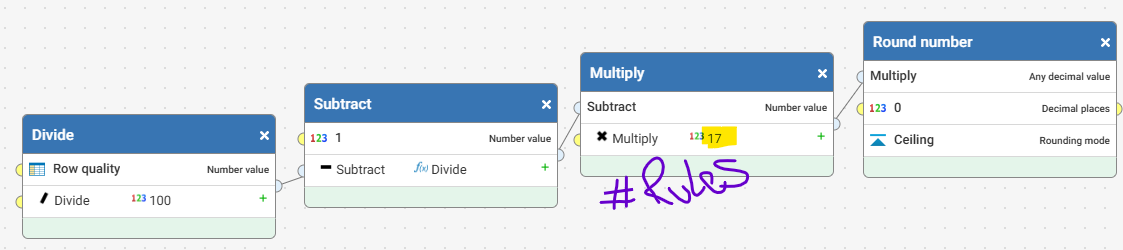
Round(

Multiply(

Subtract(

1,

Divide([c:Row quality], 100)

),

17

),

0,

'Ceiling'

)
0 -
Another option you could use would be to use a Transform step on the Failed rows output
- Exclude all the columns not auto tagged with the label DQ result
- Replace 'Pass' with 0, 'Ignore' with 0 and 'Fail' with 1
- Add all columns together to get the sum of failures
0 -
Unclear what you are doing with the count of fails by client, but Issue lists is a good way to track issues by client that allows you to monitor volumes, statuses etc. and would make it simple to calculate this metric
0