SSL Server Certificate Issue

Hi There,
We have renewed the Server Certificate and need to add the same to Aperture Data Studio. Do we need to store the .pfx file in server or in client machine to save the details in Settings → Communication . I tried to add the file location from my machine and as well as server location. both shows error "Cannot find the key file."
Any help here will be appreciated. Thanks
Key passphrase
Key file
Certificate file
Best Answer
-
OK @priyaarumugam , your version (2.12.6) is from Sept '24 so the ability to upload certificate / key is not available in that version.
Where you just have textboxes for the key and cert, they should be populated as follows
- Key file: The path to the CA's private key file, located on the server hosting the Data Studio service (for example
C:\certs\CAkey.pem). Do not use quotes in the path. - Certificate file: The path to the CA's certificate chain, also located on the server (for example
C:\certs\CARootcert.pemorC:\certs\CARootcert.crt. Again, do not use quotes in the path. - Key passphrase: The pass phrase with which the key file has been encoded
- Note that if using a PKCS12 format like
pfxfile, which is a concatenation of the certificate(a) and private key, the same file path should be used for both Key file and Certificate file fields
1 - Key file: The path to the CA's private key file, located on the server hosting the Data Studio service (for example

Answers
-
@priyaarumugam You will upload the pfx file(s) to the server via the Data Studio UI, and can be uploaded from the server or a client machine.
Are you using the same .pfx file for both "key file" and "certificate file" (ie does it contain both the full certificate chain and the private key)?
Can you include a screenshot of the error. This is what you would see if the pfx is malformed, for example:
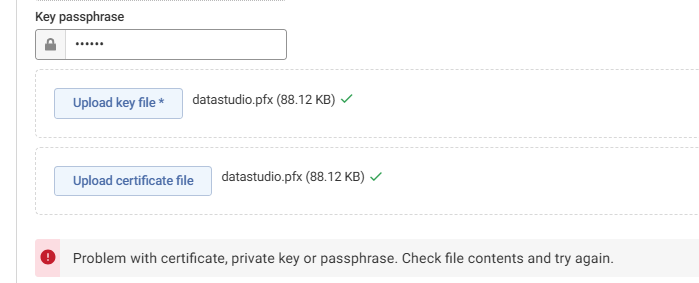 0
0 -
@Henry Simms I do not see Upload Key File and Upload Certificate file Button itself in my UI.
I do not have permission to add Image or screenshot here
0 -
@Henry Simms The Aperture Data Studio version I have is 2.12.6.208.
I do not see a option to upload the .pfx file, just a textbox is available for Key passphrase, Key file and certificate file.
0 -
@Henry Simms Thanks for your guidance. I am able to apply the New Certificate as per the instruction.
But one issue I see is the URL is showing as "Not Secure" and if I see the certificate details it shows only expired certificate.
0 -
I think you will need to hard refresh (Ctrl + F5) your browser for the new certificate to be displayed.
You'll also see "not secure" if accessing the Data Studio UI using https://localhost or and IP address rather than a hostname that is included in the certificate's CN or SAN
0