Add a delay in automation between when a trigger is triggered and when the action is carried out.

Hi,
I currently have a number of schedules and automations running in order to run some sequential steps in a find duplicate process.
I have an initial schedule that refreshes data and then an automation that detects the datasets are refreshed and kicks off a workflow that validates that the date stamp on the data is today, if it isn't it then triggers the initial schedule to refresh the data again.
The validation step only takes about 7 seconds so i am wondering if it is possible add a delay before the dataset refresh kicks off again (as it is quite literally refreshing every 7 seconds until the date is today) ideally I would like to wait 15 mins before the schedule dataset refresh kicks off again.
Also.. if possible is there a way to stop this loop if it fails say 5 times?
TIA!
Best Answer
-
Hello, no it is not possible to add a delay period before a triggered Schedule executes. The process doesnt sound from your explanation like it is 'failing'. A thought is to use a SQL query in the Dataset to only include today's data, so the refresh would not have any data to import if it has not yet been updated. An option could be for whatever process is updating the database data to also call the Schedule using API only once the data is available or to use file and dropzone that will pick up and process a file of data once it is available.
1

Answers
-
Here's an approach I've used to effectively add a delay to an automation:
First, create a Custom Event, but don't use it in any Workflow (it should have no Associations). This is the "Event that never happens".
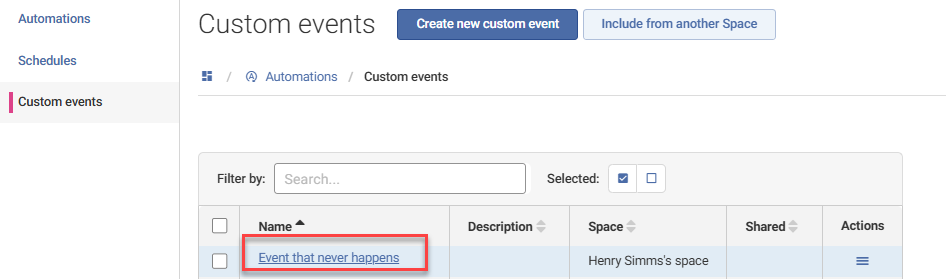
Now create an Automation that uses this "Event that never happens"
(1)as well as the event you're actually monitoring for, in my case, the "Dataset automatic load failed" event(2)on the "Suppliers" dataset. By using the Trigger the Action if time expires without all events occurring option set to 10 minutes(3), I can ensure that there's a 10 minute delay between the dataset refresh failure and the triggering of the "Retry dataset refresh" Schedule(4):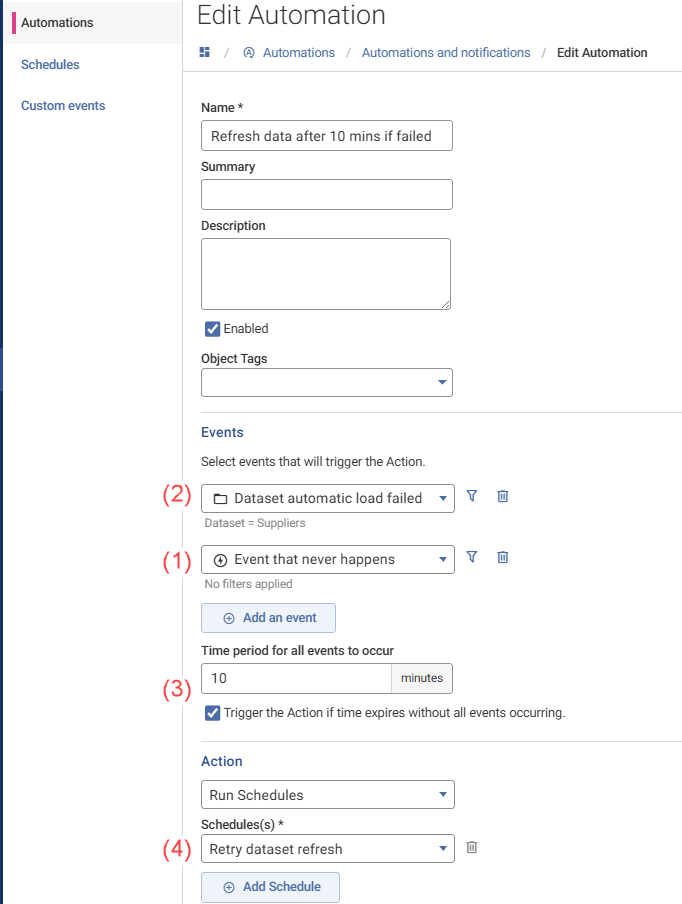
Your solution will likely be different, depending on where your data is coming from (e.g. if from a source that does not support auto-refresh, you won't use the Dataset automatic load failed event). It would also be useful to find out why your dataset might sometimes fail to refresh.
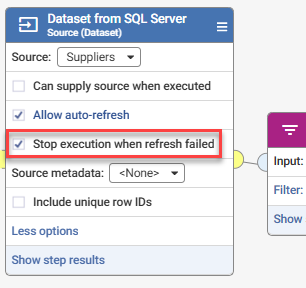
You may also want to consider using the Stop execution when refresh failed option to cause a workflow execution to fail where it can't refresh underlying data:
I've written more about dataset refresh failures and how to handle them here:
2 -
I like it Henry, very creative solution / workaround to achieve this behaviour
0
